Appearance
Player status example
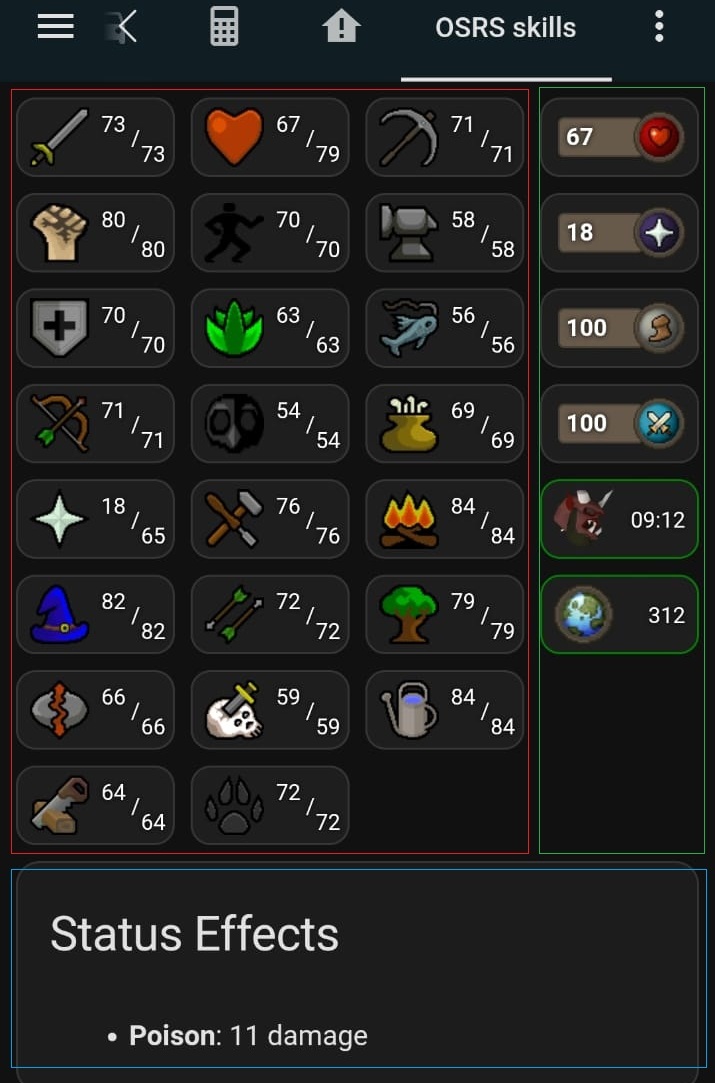
This example dashboard shows health, prayer, run energy, special attack, aggression and online status. This is the green section of this image:
yaml
type: grid
columns: 1
square: false
grid_options:
  columns: 3
  rows: auto
cards:
- type: custom:button-card
  entity: sensor.runelite_%username%_health
  show_state: false
  show_name: false
  show_icon: false
  styles:
    custom_fields:
      info:
      - display: flex
      - flex-direction: row
      - align-items: center
      - justify-content: space-between
      - width: 100%
      - height: 100%
    card:
    - background-color: "#1e1e1e"
    - border-radius: 10px
    - height: 40px
    - width: 80px
    - padding: 6px 6px
    - position: relative
  custom_fields:
    info: |
      [[[
        const runenergy = entity.attributes.current_health ?? 'N/A';
        return `
          <div style="display: flex; align-items: center; width: 100;">
            <div style="text-align:left;background-color: #685A4B; color: white; font-size: 12px; padding: 2px 3px ; font-weight: bold;  border-radius: 3px; text-shadow: 0px 0px 3px black; width: 35px; border: 1px solid #4C4338">
              ${runenergy}
            </div>
            <img src="https://oldschool.runescape.wiki/images/Hitpoints_orb.png?35952" style="width: 26px; height: 26px; margin-left: -5px" />
          </div>
        `;
      ]]]
- type: custom:button-card
  entity: sensor.runelite_%username%_prayer
  show_state: false
  show_name: false
  show_icon: false
  styles:
    custom_fields:
      info:
      - display: flex
      - flex-direction: row
      - align-items: center
      - justify-content: space-between
      - width: 100%
      - height: 100%
    card:
    - background-color: "#1e1e1e"
    - border-radius: 10px
    - height: 40px
    - width: 80px
    - padding: 6px 6px
    - position: relative
  custom_fields:
    info: |
      [[[
        const runenergy = entity.attributes.current_prayer ?? 'N/A';
        return `
          <div style="display: flex; align-items: center; width: 100;">
            <div style="text-align:left;background-color: #685A4B; color: white; font-size: 12px; padding: 2px 3px ; font-weight: bold;  border-radius: 3px; text-shadow: 0px 0px 3px black; width: 35px; border: 1px solid #4C4338">
              ${runenergy}
            </div>
            <img src="https://oldschool.runescape.wiki/images/Prayer_orb.png?ebe33" style="width: 26px; height: 26px; margin-left: -5px" />
          </div>
        `;
      ]]]
- type: custom:button-card
  entity: sensor.runelite_%username%_run_energy
  show_state: false
  show_name: false
  show_icon: false
  styles:
    custom_fields:
      info:
      - display: flex
      - flex-direction: row
      - align-items: center
      - justify-content: space-between
      - width: 100%
      - height: 100%
    card:
    - background-color: "#1e1e1e"
    - border-radius: 10px
    - height: 40px
    - width: 80px
    - padding: 6px 6px
    - position: relative
  custom_fields:
    info: |
      [[[
        const runenergy = entity.attributes.current_run_energy ?? 'N/A';
        return `
          <div style="display: flex; align-items: center; width: 100;">
            <div style="text-align:left;background-color: #685A4B; color: white; font-size: 12px; padding: 2px 3px ; font-weight: bold;  border-radius: 3px; text-shadow: 0px 0px 3px black; width: 35px; border: 1px solid #4C4338">
              ${runenergy}
            </div>
            <img src="https://oldschool.runescape.wiki/images/Run_energy_orb.png?b0ebe" style="width: 26px; height: 26px; margin-left: -5px" />
          </div>
        `;
      ]]]
- type: custom:button-card
  entity: sensor.runelite_%username%_special_attack
  show_state: false
  show_name: false
  show_icon: false
  styles:
    custom_fields:
      info:
      - display: flex
      - flex-direction: row
      - align-items: center
      - justify-content: space-between
      - width: 100%
      - height: 100%
    card:
    - background-color: "#1e1e1e"
    - border-radius: 10px
    - height: 40px
    - width: 80px
    - padding: 6px 6px
    - position: relative
  custom_fields:
    info: |
      [[[
        const runenergy = entity.attributes.current_special_attack ?? 'N/A';
        return `
          <div style="display: flex; align-items: center; width: 100;">
            <div style="text-align:left;background-color: #685A4B; color: white; font-size: 12px; padding: 2px 3px ; font-weight: bold;  border-radius: 3px; text-shadow: 0px 0px 3px black; width: 35px; border: 1px solid #4C4338">
              ${runenergy}
            </div>
            <img src="https://oldschool.runescape.wiki/images/Special_attack_orb.png?27d06" style="width: 26px; height: 26px; margin-left: -5px" />
          </div>
        `;
      ]]]
- type: custom:button-card
  entity: sensor.runelite_%username%_aggression
  show_state: false
  show_name: false
  show_icon: false
  styles:
    custom_fields:
      info:
      - justify-self: end
      - align-self: end
    card:
    - background-image: >-
        [[[ return `url('https://oldschool.runescape.wiki/images/thumb/Ensouled_demon_head_detail.png/130px-Ensouled_demon_head_detail.png?4f4ee')`; ]]]
    - background-size: 30px 30px
    - background-repeat: no-repeat
    - background-position: 6px center
    - background-color: "#1e1e1e"
    - border-radius: 10px
    - border-color: >-
        [[[ const status = entity.attributes.status ?? 'unknown'; return status === 'active' ? 'green' : 'red'; ]]]
    - height: 40px
    - width: 80px
    - padding-left: 10px
    - position: relative
  custom_fields:
    info: |-
      [[[
        const totalSeconds = entity.attributes.seconds ?? 0;
        const minutes = Math.floor(totalSeconds / 60).toString().padStart(2, '0');
        const seconds = (totalSeconds % 60).toString().padStart(2, '0');
        const formatted = `${minutes}:${seconds}`;
        return `
          <div style="position: absolute; right: 6px; bottom: 6px; text-align: right; font-size: 11px; line-height: 12px; color: white; text-shadow: 0px 0px 3px black;">
            <div style="position: relative">
              <div style="position: absolute; right: 0px; top: -18px">${formatted}</div>
            </div>
          </div>
        `;
      ]]]
- type: custom:button-card
  entity: sensor.runelite_%username%_player_status
  show_state: false
  show_name: false
  show_icon: false
  styles:
    custom_fields:
      info:
      - justify-self: end
      - align-self: end
    card:
    - background-image: >-
        [[[ return `url('https://oldschool.runescape.wiki/images/World_map_icon.png?6dae2')`; ]]]
    - background-size: 30px 30px
    - background-repeat: no-repeat
    - background-position: 6px center
    - background-color: "#1e1e1e"
    - border-radius: 10px
    - border-color: >-
        [[[ const status = entity.attributes.is_online ?? false; return status ? 'green' : 'red'; ]]]
    - height: 40px
    - width: 80px
    - padding-left: 10px
    - position: relative
  custom_fields:
    info: |-
      [[[
        const world = entity.attributes.world;
        return `
          <div style="position: absolute; right: 6px; bottom: 6px; text-align: right; font-size: 11px; line-height: 12px; color: white; text-shadow: 0px 0px 3px black;">
            <div style="position: relative">
              <div style="position: absolute; right: 0px; top: -18px">${world}</div>
            </div>
          </div>
        `;
      ]]]