Appearance
Skills overview example
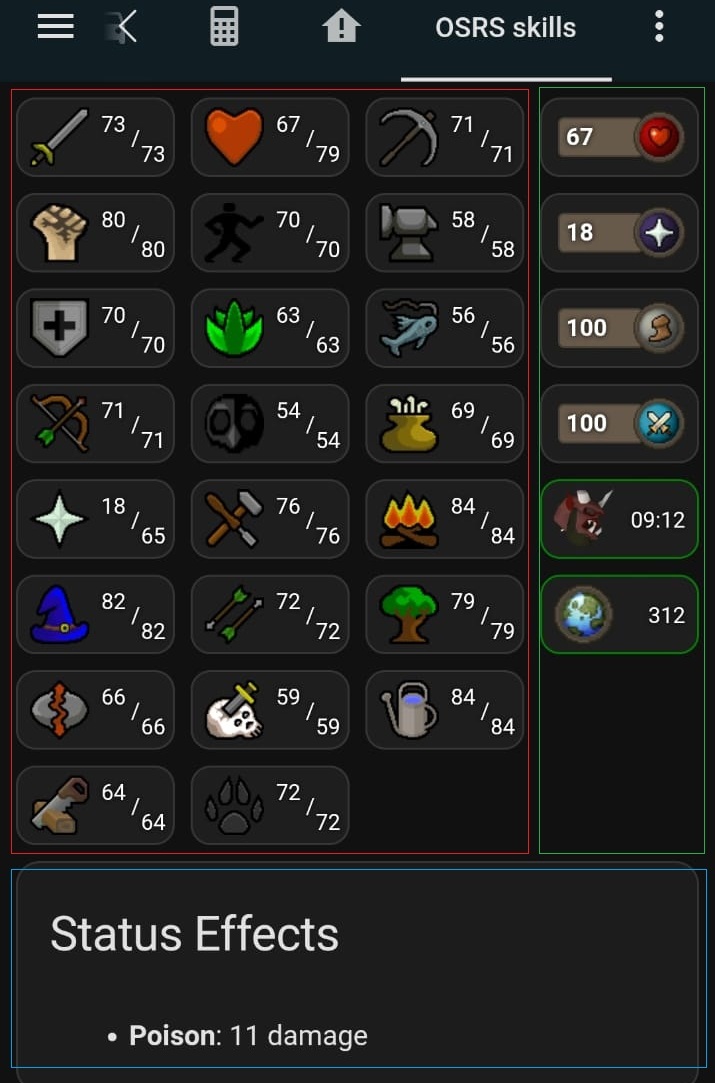
This example recreates the OSRS skills screen using custom:button-card and skill sensors.
It looks like the red section in the image below. Copy the yaml below and replace %username% with your own username.
yaml
type: grid
columns: 3
square: false
cards:
- type: custom:button-card
  entity: sensor.runelite_%username%_skill_attack
  show_state: false
  show_name: false
  show_icon: false
  styles:
    custom_fields:
      info:
      - justify-self: end
      - align-self: end
    card:
    - background-image: |-
        [[[
          const skillName = entity.attributes.name?.replace(/\s+/g, '_') ?? 'Unknown';
          return `url('https://oldschool.runescape.wiki/images/${skillName}_icon_%28detail%29.png')`;
        ]]]
    - background-size: 30px 30px
    - background-repeat: no-repeat
    - background-position: 6px center
    - background-color: "#1e1e1e"
    - border-radius: 10px
    - height: 40px
    - width: 80px
    - padding-left: 10px
    - position: relative
  custom_fields:
    info: |
      [[[[
        const level = entity.attributes.level ?? 'N/A';
        const virtual = entity.attributes.virtual_level ?? '';
        return `
          <div style="position: absolute; right: 6px; bottom: 6px; text-align: right; font-size: 11px; line-height: 12px; color: white; text-shadow: 0px 0px 3px black;">
            <div style="position: relative">
              <div style="position: absolute; left: -30px; top: -25px">${virtual}</div>
              <div style="position: absolute; left: -15px; top: -18px">/</div>
              <div style="position: absolute; left: -10px; top: -10px">${level}</div>
            </div>
          </div>
        `;
      ]]]]
- type: custom:button-card
  entity: sensor.runelite_%username%_skill_hitpoints
  show_state: false
  show_name: false
  show_icon: false
  styles:
    custom_fields:
      info:
      - justify-self: end
      - align-self: end
    card:
    - background-image: |-
        [[[
          const skillName = entity.attributes.name?.replace(/\s+/g, '_') ?? 'Unknown';
          return `url('https://oldschool.runescape.wiki/images/${skillName}_icon_%28detail%29.png')`;
        ]]]
    - background-size: 30px 30px
    - background-repeat: no-repeat
    - background-position: 6px center
    - background-color: "#1e1e1e"
    - border-radius: 10px
    - height: 40px
    - width: 80px
    - padding-left: 10px
    - position: relative
  custom_fields:
    info: |
      [[[
        const level = entity.attributes.level ?? 'N/A';
        const virtual = entity.attributes.virtual_level ?? '';
        return `
          <div style="position: absolute; right: 6px; bottom: 6px; text-align: right; font-size: 11px; line-height: 12px; color: white; text-shadow: 0px 0px 3px black;">
            <div style="position: relative">
              <div style="position: absolute; left: -30px; top: -25px">${virtual}</div>
              <div style="position: absolute; left: -15px; top: -18px">/</div>
              <div style="position: absolute; left: -10px; top: -10px">${level}</div>
            </div>
          </div>
        `;
      ]]]
- type: custom:button-card
  entity: sensor.runelite_%username%_skill_mining
  show_state: false
  show_name: false
  show_icon: false
  styles:
    custom_fields:
      info:
      - justify-self: end
      - align-self: end
    card:
    - background-image: |-
        [[[
          const skillName = entity.attributes.name?.replace(/\s+/g, '_') ?? 'Unknown';
          return `url('https://oldschool.runescape.wiki/images/${skillName}_icon_%28detail%29.png')`;
        ]]]
    - background-size: 30px 30px
    - background-repeat: no-repeat
    - background-position: 6px center
    - background-color: "#1e1e1e"
    - border-radius: 10px
    - height: 40px
    - width: 80px
    - padding-left: 10px
    - position: relative
  custom_fields:
    info: |
      [[[
        const level = entity.attributes.level ?? 'N/A';
        const virtual = entity.attributes.virtual_level ?? '';
        return `
          <div style="position: absolute; right: 6px; bottom: 6px; text-align: right; font-size: 11px; line-height: 12px; color: white; text-shadow: 0px 0px 3px black;">
            <div style="position: relative">
              <div style="position: absolute; left: -30px; top: -25px">${virtual}</div>
              <div style="position: absolute; left: -15px; top: -18px">/</div>
              <div style="position: absolute; left: -10px; top: -10px">${level}</div>
            </div>
          </div>
        `;
      ]]]